
AI Planning
Which AI Project Should a Small Business Do First?
Choose a first AI or automation project by checking the workflow, data risk, and a measurable pilot before buying another tool.
If you have several AI ideas and can fund only one experiment, start with a workflow that matters to a current business goal, has usable inputs, and can be checked by a person before a mistake reaches a customer. Write down what happens today before buying a tool. If the data is scattered or the decision is sensitive, fix that constraint first. The first project might be an integration or a simpler automation, with no AI at all.
Put the Work Ahead of the Tool
Name the business goal in ordinary terms: respond to inquiries before they go cold, reduce order-entry rework, or give staff a reliable view of open jobs. Then ask the person doing the work to walk through one real item from arrival to completion. Where does it stall? Which systems hold the needed information? Who corrects an error?
Keep a short inventory of work already happening, including informal experiments. A useful row can fit on one line:
- Workflow and goal: What job is being done, and what business problem does it affect?
- Current path: Which people and tools touch it now? Note any AI tools staff already use, including tools they pay for themselves.
- Candidate change: What would be different? Label it AI, rule-based automation, integration, custom software, or a process change.
- Evidence and friction: How often does the work occur? Where could you get a baseline? Are the inputs accessible and trustworthy?
- Owner and risk: Who can test it, review its output, and stop it? What data or decision must stay under human control?
Inventory existing pilots alongside new ideas. A tool somebody already uses is neither a proven win nor a blank slate: check what it costs, what information goes into it, and whether its output changes the work.
Check the Boundary Before You Rank Anything
For each candidate, identify the data it would read, the destination it would send data to, and the person allowed to grant access. Do not put customer records or confidential material into an unapproved tool to find out if the idea works. Ask how long the vendor keeps inputs, who can see them, and whether the team can delete them. If those answers are unavailable, pause the pilot.
Keep high-impact decisions with a qualified human. An assistant might prepare a draft or flag an exception; it should not silently make a hiring, lending, medical, or legal decision. Define what a reviewer will inspect and how to reverse a bad output. If your source records disagree, clean them up before an integration spreads the error.
This check is a gate, not a score. A promising idea with inaccessible data, unclear permission, or no accountable reviewer is not ready to pilot.
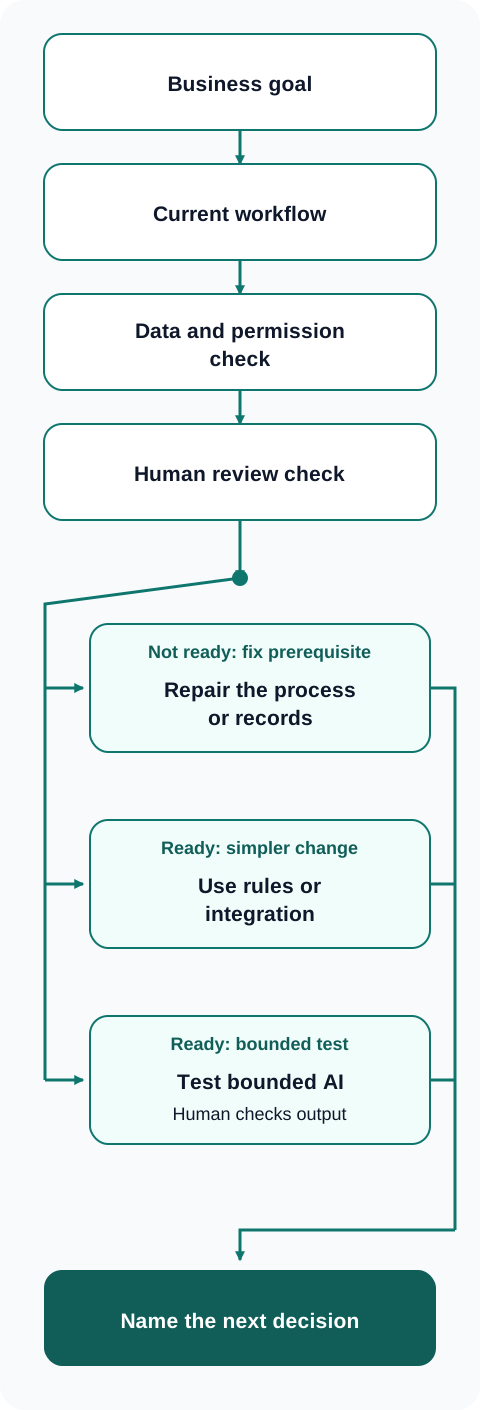
Decision flow for a proposed workflow. A failed safety or data check sends the team to repair the prerequisite before a pilot.
Choose the Smallest Useful Change
Compare the surviving candidates by the business problem they address, the frequency and cost of today's friction, the quality of their inputs, and the effort to test them safely. You do not need a weighted spreadsheet to spot an obvious prerequisite. If the same missing customer ID breaks several workflows, resolve that before funding separate AI experiments.
After checking the safety boundary, use this map to decide what to do with each candidate. Compare its value to a current goal with its practical readiness for a small test. Privacy, data access, and human review are a pass-or-stop gate, never a score to offset with expected value.
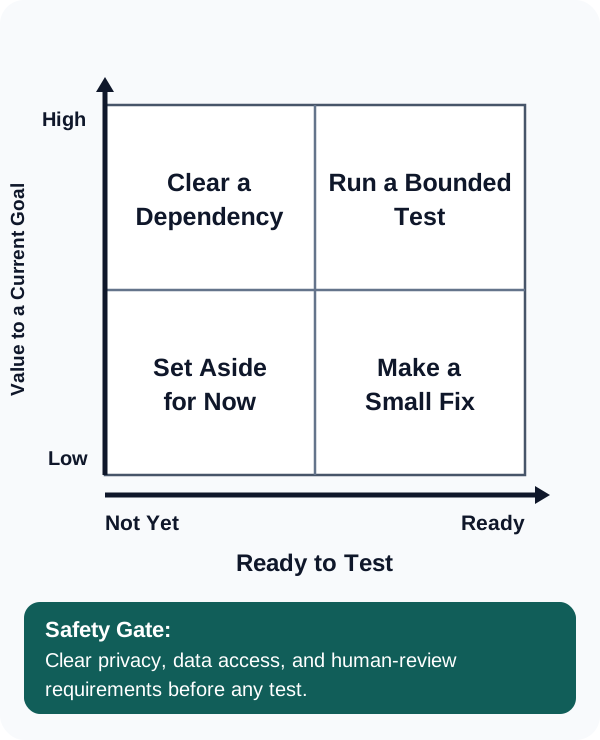
Use value and test readiness to choose a next step. The safety gate sits outside the matrix.
Ask what kind of change the workflow actually needs:
- Process repair: Assign an owner and standardize a handoff when the steps themselves are disputed.
- Rules or integration: Route a form, sync approved fields, or send a reminder when inputs and decisions are predictable.
- Custom software: Build a focused internal tool when the current stack cannot support a necessary workflow.
- AI: Try a bounded task such as drafting from approved material or extracting fields from variable documents, with human review of uncertain results.
AI can sit inside a larger workflow, but it is not a substitute for access rights, accurate records, or a way to handle exceptions. The best first project is the one the team can evaluate and either keep or stop, not the one with the most impressive demo.
A Service Company's First Decision
Imagine a small service company with limited staff time. Its owner has three proposals. First, use AI to write customer replies from the shared inbox. Second, move website inquiries into the existing job tracker and assign each to a named person. Third, use AI to summarize job notes for the weekly meeting.
The inbox replies may touch private customer details and could send an incorrect promise. The company has not decided who approves replies, so this candidate waits. The inquiry handoff has a clear owner, a visible queue, and a reversible test; ordinary form routing or integration may solve it without AI. The meeting summaries could be useful, but staff need agreement about which notes may be processed and who checks the summary. The owner examines the inquiry handoff first.
A different shop might choose differently. If its inquiry records are unreliable, fixing data entry would come before connecting the form. If the summaries involve sensitive information, they may stay manual.
Give the Pilot a Decision Date
Before turning on the chosen change, write a pilot charter that fits on one card:
- Owner and scope: Name the person accountable, the workflow, the users, and the cases excluded from the test.
- Baseline: Record how the same work is handled now. Use a count or time observation you can actually collect; if you do not have one yet, gather it before claiming improvement.
- Measure: Decide what to compare, such as time from inquiry to assignment, correction requests, or staff review time. Count downstream cleanup, not just faster first drafts.
- Full cost: Include setup and integration work, software and usage fees, staff training, review time, security work, maintenance, and the cost of correcting errors. Estimate rather than invent a return.
- Guardrails: Limit data access, require the named review step, log exceptions, and keep a manual fallback. Specify what failure stops the test immediately.
- Decision: Set a date to stop, revise, or expand. Stop if a safety boundary fails or the work becomes harder to trust. Revise if the change helps some cases but creates new rework. Expand only if the measured result, total cost, and staff adoption justify it.
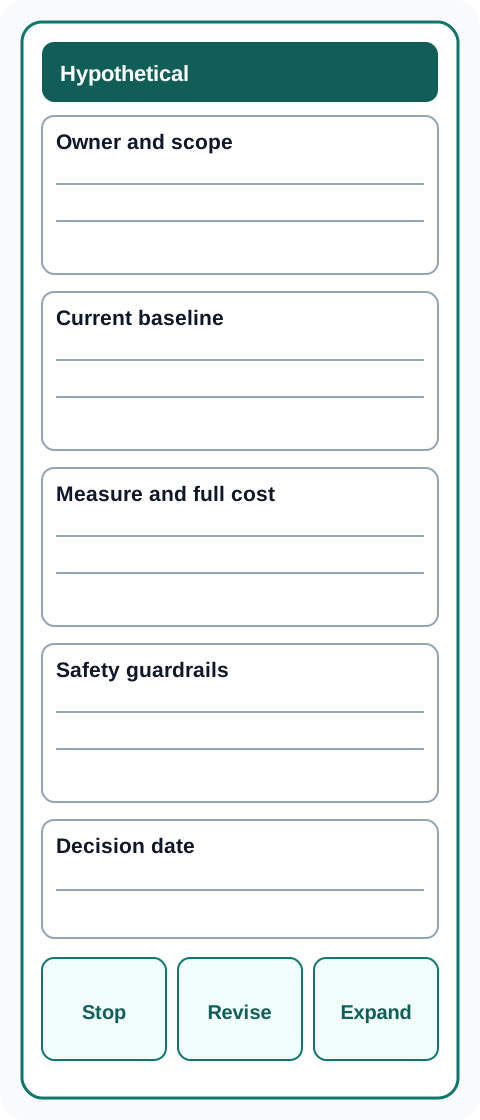
Pilot decision card. Fill in the baseline, cost, review step, and stop date before testing.
At the decision date, compare the new path with the old one. Ask staff whether they used it as intended and where they worked around it. If time fell because someone quietly took on extra review, that is part of the cost. If the change worked without AI, credit the simpler change. Document what you learned even when you stop.
Get a Second Set of Eyes on the Workflow
Talegen's AI Workflow Audit maps existing work, identifies automation candidates, and records data-sensitivity risks before recommending a first scope. Bring one workflow, the tools it touches, and the decision you are trying to make.
Book a consultation to discuss which change is worth testing first.